¶ Dashboard Overview
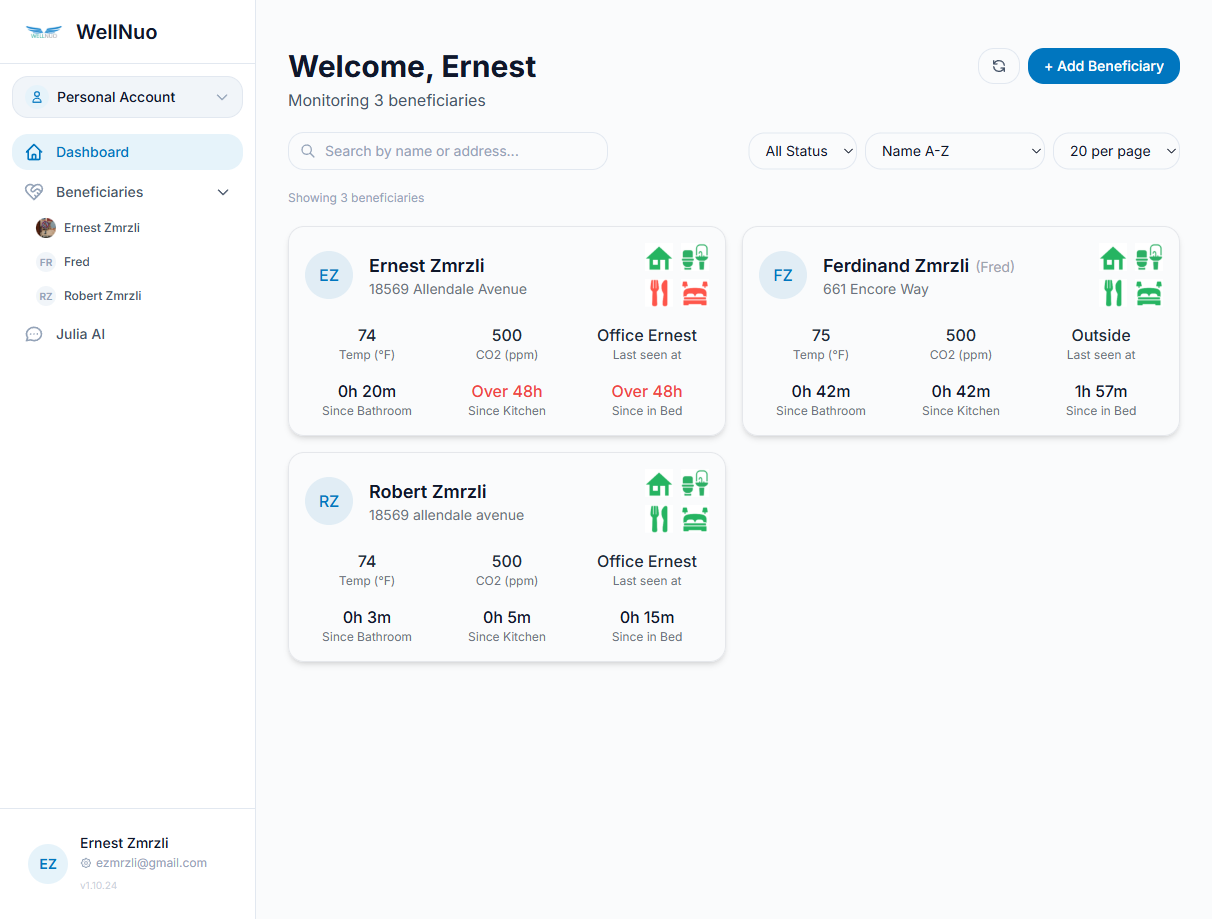
The Dashboard is where you monitor all your beneficiaries at a glance.
¶ Accessing the Dashboard
After logging in at app.wellnuo.com, you'll be taken directly to the Dashboard.
¶ Dashboard Features
¶ Beneficiary Cards
Each beneficiary is displayed as a card showing:
- Name and Address - Identifying information
- Status Icons - Visual indicators for environmental conditions and room activity
- Environmental Data: Temperature and CO2 levels
- Last Seen Location - Where the beneficiary was last detected
- Activity Timers: Time since bathroom, kitchen, and bed
¶ Status Icons
| Icon | Description |
|---|---|
| House | Environmental conditions (temperature & air quality) |
| Bathroom | Bathroom activity |
| Kitchen | Kitchen activity |
| Bed | Bedroom/sleep activity |
¶ Color Meanings
| Color | House (Environment) | Room Activity (Bathroom, Kitchen, Bed) |
|---|---|---|
| 🟢 Green | Conditions are good | Normal activity |
| 🟡 Yellow | Conditions are worrisome | Room unattended for > 6 hours |
| 🔴 Red | Conditions are bad | Room unattended for > 12 hours |
¶ Search and Filters
- Search - Find beneficiaries by name or address
- Filter by Status - All, Online, Offline, or Inactive
- Sort - By name, score, status, or activity
¶ Quick Actions
- Refresh Dashboard - Update all beneficiary data
- Add Beneficiary - Add a new person to monitor
¶ Clicking a Beneficiary
Click on any beneficiary card to view their detailed wellness dashboard.