¶ WellPlugs and Sensors
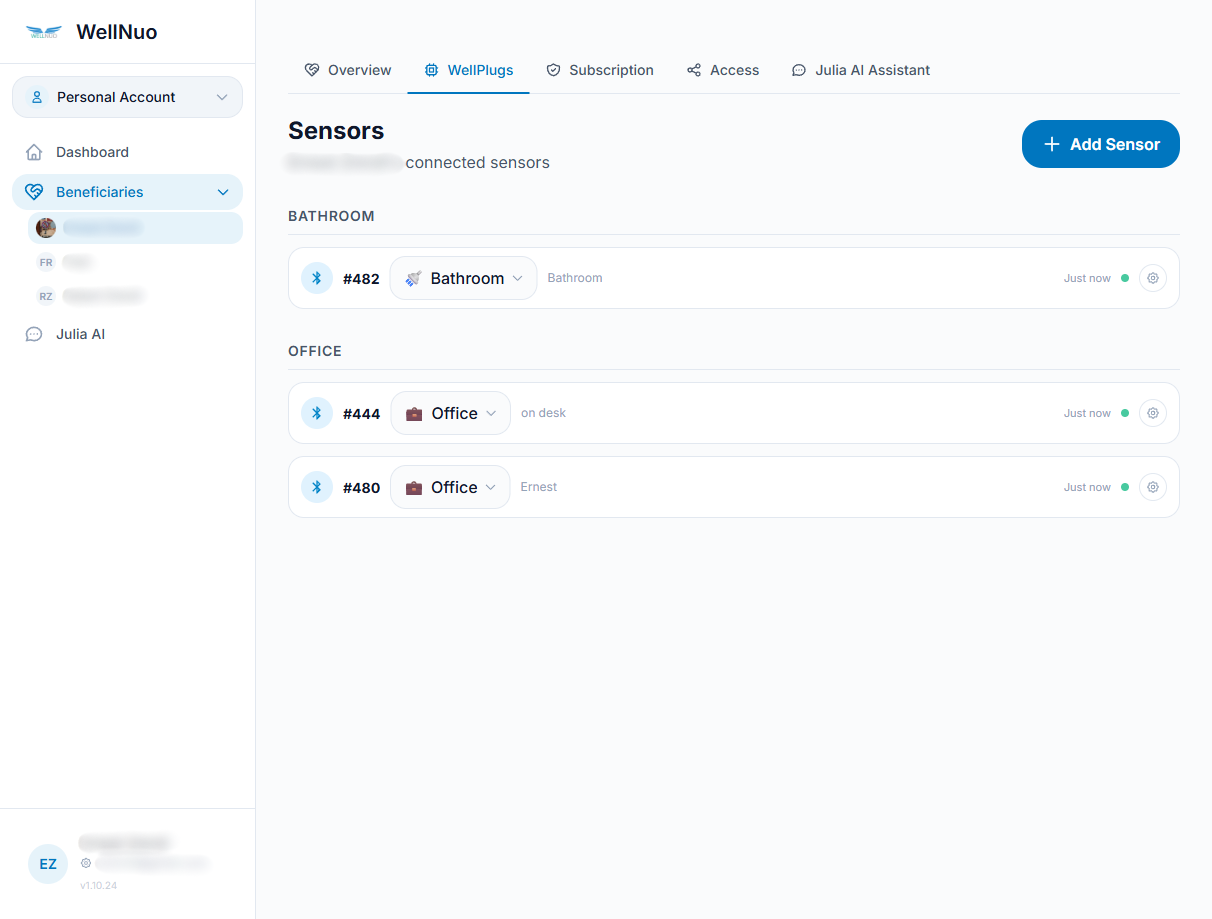
WellPlugs are smart sensors that monitor activity and environmental conditions in your loved one's home.
¶ What WellPlugs Monitor
- Motion/Presence - Detect when someone is in a room
- Temperature - Room temperature in Fahrenheit
- Humidity - Room humidity percentage
- Air Quality (CO2) - Carbon dioxide levels in ppm
- Air Pressure - Barometric pressure
- Light Levels - Room brightness
¶ Adding a New Sensor
- Go to the beneficiary's WellPlugs tab
- Click Add Sensor
- Ensure your sensor is powered on
- Keep the sensor within 1 metre of your device
- Enable Bluetooth on your device
- Click Scan for Sensors
- Select the WP_ sensor from the list
- Enter your WiFi credentials
Note: You only need to configure WiFi on one sensor. All other sensors will automatically learn the WiFi settings from each other.
¶ Viewing Sensors
Sensors are organized by room:
- Each sensor shows its ID number (e.g., #482)
- Room assignment with emoji (e.g., 🚿 Bathroom)
- Custom label (e.g., "on desk")
- Last report time
- Status indicator (Online/Offline)
¶ Sensor Status
| Status | Meaning |
|---|---|
| Online | Sensor is connected and reporting |
| Offline | Sensor is not communicating |
| Just now | Recent activity detected |
← Previous: Managing Beneficiaries | Next: Julia AI Assistant →